Python Logs
zharp-logs sends logs from Python apps — scripts, Django, Flask, FastAPI, Celery — and captures uncaught exceptions with their traceback. It has no dependencies, works with Python's own logging, and runs on Python 3.8 and up.
Install
pip install zharp-logs
# or
poetry add zharp-logs
# or
uv add zharp-logs
The package is zharp-logs on PyPI; you import it as zharp_logs. It uses only the standard library.
API key
- In the dashboard, open Integrations & API and choose Main API keys.
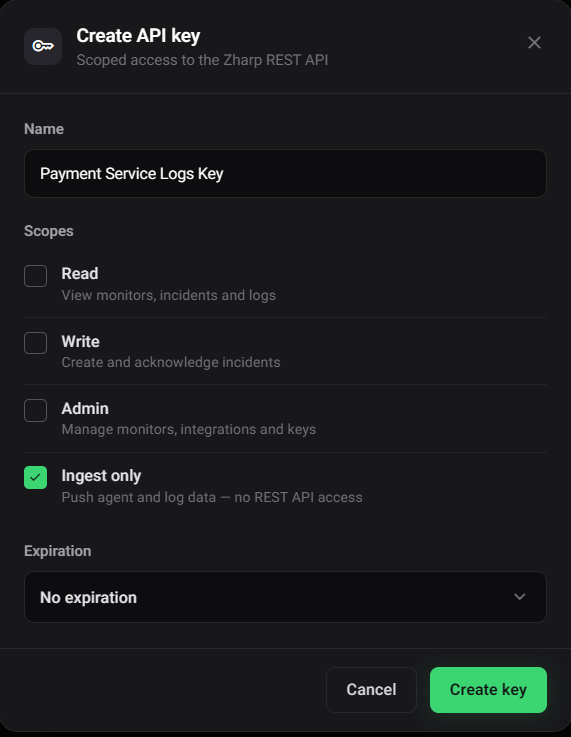
- Click Create API key, give it a name, and tick Ingest only. That key can send data but has no access to the REST API, so it's safe in a server's environment — and it's available on every plan.
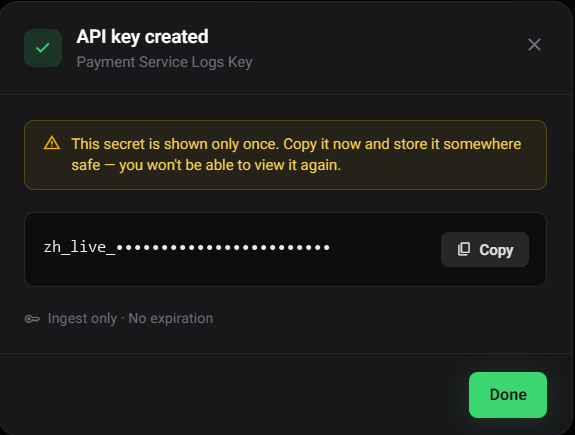
- Click Create key and copy the key. It's shown only once.
Start it
Importing the package starts nothing. Call zharp_logs.init() once, as early as possible — logs written before that are dropped. Give it its settings in code, or let it read them from the environment.
In code
import zharp_logs

zharp_logs.init(
    api_key="YOUR_INGEST_ONLY_KEY",
    service="checkout-api",
    environment="production",
    app_version="1.4.2",
)
From the environment
ZHARP_API_KEY=your-ingest-only-key
ZHARP_SERVICE=checkout-api      # optional — defaults to the name in your pyproject.toml
ZHARP_ENV=production            # optional — no default
import zharp_logs

zharp_logs.init()   # reads ZHARP_* from the environment
You can mix the two: what you pass to init() is used, and anything you leave out is read from the environment, setting by setting. Either way, one line goes to stderr on startup:
[Zharp] Logging active — service "checkout-api", environment "production"
| Situation | Printed |
|---|---|
| No key in the options or ZHARP_API_KEY — nothing starts, every logging call does nothing | [Zharp] No API key found — pass api_key to zharp_logs.init(), or set ZHARP_API_KEY |
| No service name — it starts anyway | [Zharp] No service name — pass service to zharp_logs.init() or set ZHARP_SERVICE. Using 'unknown-service'. |
| ZHARP_DISABLED is set — nothing starts, whatever the code asks for | [Zharp] Logging disabled by ZHARP_DISABLED — nothing will be sent |
A missing key never raises, so a test run or a preview environment without one still starts. Calling init() again replaces the running setup; what the old one had queued is still sent.
Options
| Option | Environment variable | Default |
|---|---|---|
api_key | ZHARP_API_KEY | — (nothing starts without one) |
service | ZHARP_SERVICE, then OTEL_SERVICE_NAME | The name in your pyproject.toml, else unknown-service |
environment | ZHARP_ENV | None — unset means no tag |
app_version | ZHARP_VERSION | None |
source | ZHARP_SOURCE | None |
endpoint | ZHARP_ENDPOINT | https://api.zharp.io/api/v1 |
capture_logging | ZHARP_CAPTURE_LOGGING | Off — see Python's logging |
capture_exceptions | — | On — see Uncaught exceptions |
flush_interval | — | 5 seconds |
max_batch_size | — | 50 |
| — | ZHARP_DISABLED | true, 1, yes or on: start nothing |
Logging
zharp_logs.debug("Cache miss", {"key": "user:42"})
zharp_logs.info("Request received", {"path": "/checkout"})
zharp_logs.warn("Rate limit approaching", {"remaining": 5})
zharp_logs.error("Stripe webhook failed", {"event_id": "evt_123"})
zharp_logs.fatal("Database connection lost")

# Any level, and optionally another service name for this one log:
zharp_logs.log("error", "Charge declined", {"amount": 5000}, service="payments")
warning and critical work too — the names Python's logging uses. The dict is optional and is kept with the log. error and fatal are sent straight away; the other levels go in batches from a background thread, so logging never waits on the network, and it never raises.
Exceptions
A caught exception brings its type and full traceback — chained causes included — by itself:
try:
    charge(order)
except Exception as e:
    zharp_logs.exception("Payment failed", {"order_id": order.id})   # the exception being handled
    zharp_logs.error(e)                                              # the exception itself
    zharp_logs.error("Payment failed", exc=e)                        # your message, with it
    zharp_logs.capture_exception()                                   # the same as the first, no message
The message reads ValueError: Card declined when the exception is the message. An exception made but never raised has no traceback; it gets the place it was logged instead.
zharp_logs.set_context({"region": "eu-west"})   # added to every log's context
zharp_logs.reset_session_id()                     # e.g. per job in a long-running worker
Python's logging
Most apps already log through logging. ZharpHandler sends it to Zharp: each record goes at the matching level (WARNING → warn, CRITICAL → fatal) with the logger's name, any extra= fields, and the traceback of logger.exception() or exc_info=True.
import logging
import zharp_logs

zharp_logs.init()
logging.getLogger().addHandler(zharp_logs.ZharpHandler(logging.INFO))

log = logging.getLogger("shop.checkout")
log.warning("Stock low for %s", sku, extra={"sku": sku})   # extra= fields go with the log
log.exception("Pricing failed")                             # with the traceback
Or let init() attach it to the root logger, once:
zharp_logs.init(capture_logging=True)        # INFO and up, through the root logger
zharp_logs.init(capture_logging="WARNING")   # or from a level
Where the Zharp agent already reads your app's output — Docker, journald, Kubernetes — send logging through one of them, not both, or every line arrives twice.
Django
# settings.py
import zharp_logs

zharp_logs.init()   # ZHARP_* from the environment

LOGGING = {
    "version": 1,
    "disable_existing_loggers": False,
    "handlers": {"zharp": {"class": "zharp_logs.ZharpHandler", "level": "INFO"}},
    "root": {"handlers": ["zharp"], "level": "INFO"},
}
Flask and FastAPI
# app.py — Flask
import zharp_logs
from flask import Flask

zharp_logs.init(capture_logging=True)
app = Flask(__name__)
# main.py — FastAPI
import zharp_logs
from fastapi import FastAPI

zharp_logs.init(capture_logging=True)
app = FastAPI()
Both frameworks log a request that fails with a 500 at ERROR, traceback included, so it reaches Zharp through the handler.
Celery
# celery_app.py
import zharp_logs
from celery import Celery
from celery.signals import task_failure

zharp_logs.init(capture_logging=True)
app = Celery("shop")

@task_failure.connect
def send_failure(exception=None, task_id=None, sender=None, **_):
    zharp_logs.error(exception, {"task": sender.name, "task_id": task_id})
Uncaught exceptions
From the moment init() succeeds, an uncaught exception is sent with its traceback — fatal in the main thread, error in another thread — with type: "uncaughtException" and, for a thread, its name. Then Python prints it and the program ends as it would have. Turn it off with capture_exceptions=False.
An exception your web framework catches and turns into a 500 isn't uncaught — it's logged by the framework, so use the logging handler to get those.
See your logs
Open Logs in the dashboard sidebar and pick your service in the service dropdown. Click a line to see its metadata and traceback.
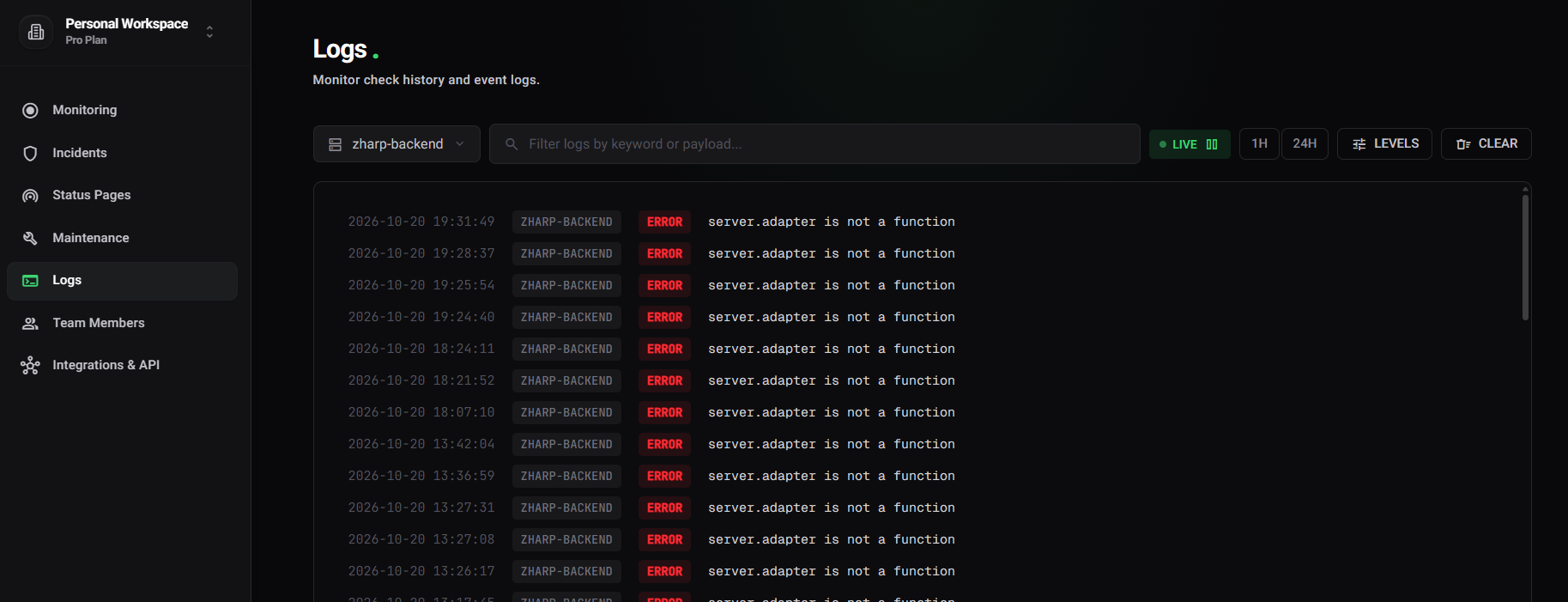
To be told when something shows up, add a log monitor.
What a log carries
{
  "service": "checkout-api",
  "level": "error",
  "message": "Payment failed",
  "timestamp": "2026-10-26T09:14:32.041Z",
  "environment": "production",
  "version": "1.4.2",
  "metadata": {
    "name": "ValueError",
    "stack": "Traceback (most recent call last):\n  File \"app.py\", line 42, in pay\n    charge(order)\n…\nValueError: Card declined",
    "order_id": 99,
    "sessionId": "a3f8c2d1-…",
    "environment": "production",
    "context": {
      "hostname": "checkout-7d9f8b-x2k4q",
      "pid": "4182",
      "pythonVersion": "3.12.4",
      "platform": "linux",
      "osVersion": "Linux-6.1.0-x86_64-with-glibc2.36",
      "appVersion": "1.4.2"
    }
  }
}environment,version(fromapp_version) andsourceare top-level tags, sent when set. See Unified service tagging.- Your own fields sit at the top of
metadata, next to an exception'snameandstackand thesessionId— one per run of the program. - Where it ran goes under
context:hostname(the pod name in Kubernetes),pid,pythonVersion,platformandosVersion, plus whatever you set withset_context.
Delivery
- Logs wait in a queue of up to 500 entries; when it is full, the oldest is dropped. Every
flush_interval, up tomax_batch_sizeof them are sent, and no request is larger than about 1 MB — a larger batch is split. - Requests go to
/agent/logswith the key in anX-API-KEYheader andX-Zharp-SDK: python-logs/0.1.0. - A request that fails on the network or with a 5xx is tried three times in all: once, then after 2 seconds, then after 4. A 4xx is not retried.
- The sending thread never keeps a program running: when it ends, what's left is sent (waiting at most 2 seconds), so a script needs nothing at the end.
- Workers forked after
init()— gunicorn, uWSGI, Celery,multiprocessing— start their own sender on their first log.
zharp_logs.flush()       # send what's queued and wait for it (up to 5 seconds by default)
zharp_logs.close()       # send it all and stop; logs after this are dropped until init() again
zharp_logs.is_active()   # whether init() succeeded and logs are being sent
In a serverless function, flush before returning — the platform may freeze the process right after:
import zharp_logs

zharp_logs.init()

def handler(event, context):
    try:
        return process(event)
    finally:
        zharp_logs.flush()   # send before the platform freezes the function
The source is at github.com/zharp-io/zharp-python-lib.