JavaScript Logs
@zharp/logs sends logs from browser and Node.js apps, and captures uncaught errors and unhandled promise rejections without another line of code — on its own, or as a transport for Winston, Pino and NestJS.
For distributed tracing and session replay, add @zharp/apm. The two packages work alone or together; together, every log written inside a trace carries that trace's id.
Install
npm install @zharp/logs
# or
pnpm add @zharp/logs
# or
yarn add @zharp/logs
The version on npm today is 1.0.9. It sends logs and captures errors, started with ZharpLogger.init({ apiKey, service, … }). Starting from environment variables, the @zharp/logs/init entry, the activation line, ZHARP_DISABLED, the environment/version/source tags, the source and endpoint options, isActive, replacing a running setup with a second init(), and working with @zharp/apm all need @zharp/logs 1.1.0. Code written for 1.0.9 keeps working on 1.1.0 unchanged. Check what you have with npm ls @zharp/logs.
@zharp/logs sends logs only. Tracing and session replay are not in any version of it — they are @zharp/apm.
API key
- In the dashboard, open Integrations & API and choose Main API keys.
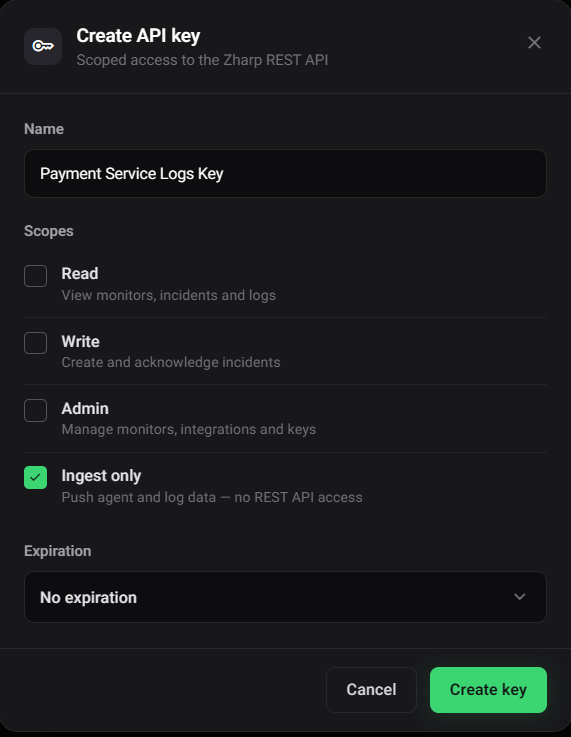
- Click Create API key, give it a name, and tick Ingest only. That key can send data but has no access to the REST API, so it's safe in a server's environment or a browser bundle — and it's available on every plan.
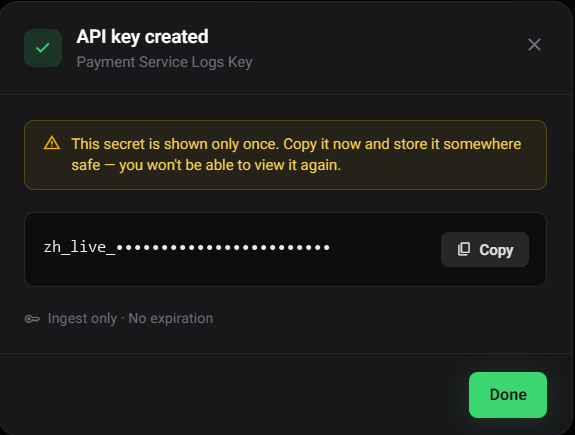
- Click Create key and copy the key. It's shown only once.
Start it
Importing the package starts nothing. Call ZharpLogger.init() once, as early as possible: it hooks the error handlers and starts sending. Logs written before that are dropped. Give it its settings in code, or let it read them from the environment — either works.
In code — Node.js or the browser
Pass the settings to init(). In a browser this is the only way, since a browser has no environment to read:
import { ZharpLogger } from '@zharp/logs';

// Once, at startup (main.ts, _app.tsx, index.js …)
ZharpLogger.init({
  apiKey: 'YOUR_INGEST_ONLY_KEY',   // an Ingest only key — safe in a bundle
  service: 'checkout-web',
  environment: 'production',
  appVersion: '1.4.2',
});
Without service, a browser's logs are filed under unknown-service, so always set it there.
From the environment — Node.js
Set the variables where the app runs:
ZHARP_API_KEY=your-ingest-only-key
ZHARP_SERVICE=checkout-api      # optional — defaults to the name in your package.json
ZHARP_ENV=production            # optional — defaults to NODE_ENV
and call init() with nothing:
import { ZharpLogger } from '@zharp/logs';

ZharpLogger.init();   // reads ZHARP_* from the environment
Or don't touch your code at all: start Node with the @zharp/logs/init entry, which calls init() for you:
node --import @zharp/logs/init app.js

# or through NODE_OPTIONS, when you don't control the node command
NODE_OPTIONS="--import @zharp/logs/init" npm start
You can mix the two ways: what you pass to init() is used, and anything you leave out is read from the environment, setting by setting.
Either way, one line is printed on startup (with console.info in a browser):
[Zharp] Logging active — service "checkout-api", environment "production"
With no environment set it reads no environment set in place of environment "…". The app then uses ZharpLogger as usual, and gets the logger that was started whether it requires the package or imports it.
| Variable | Option | Notes |
|---|---|---|
ZHARP_API_KEY | apiKey | |
ZHARP_SERVICE, then OTEL_SERVICE_NAME | service | Then the name in your app's package.json; with none of these, unknown-service, with a warning |
ZHARP_ENV, then NODE_ENV | environment | No default — unset means no tag |
ZHARP_VERSION | appVersion | |
ZHARP_SOURCE | source | |
ZHARP_ENDPOINT | endpoint | Default https://api.zharp.io/api/v1 |
ZHARP_CAPTURE_CONSOLE | captureConsole | all, or a list such as warn,error |
ZHARP_DISABLED | — | true, 1, yes or on: start nothing |
A browser reads none of these: bundles often carry a process.env baked in at build time, which would tag a page with the build machine's settings.
What it prints when it doesn't start
| Situation | Printed |
|---|---|
| No API key in the options or ZHARP_API_KEY — nothing starts, every logging call does nothing | [Zharp] No API key found — set ZHARP_API_KEY or call ZharpLogger.init({ apiKey }) |
| No service name — it starts anyway | [Zharp] No service name — pass `service` to init(), set ZHARP_SERVICE, or give your package.json a name. Using 'unknown-service'. |
| ZHARP_DISABLED is set — nothing starts, whatever the code asks for | [Zharp] Logging disabled by ZHARP_DISABLED — nothing will be sent |
A missing key never throws, so a test run or a preview environment without one still starts. Calling init() again replaces the running setup: the old one's handlers are removed, what it had queued is still sent with its own key, and the new configuration takes over.
Options
Everything is optional in Node; in a browser, pass apiKey and service.
| Option | Default | What it does |
|---|---|---|
apiKey | ZHARP_API_KEY | The Ingest only key the SDK sends with. Without one, nothing starts. |
service | ZHARP_SERVICE, then OTEL_SERVICE_NAME, then the package.json name, then unknown-service | The service every log is filed under. |
environment | ZHARP_ENV, then NODE_ENV; none in a browser | The log's Environment. Never defaults to production. |
appVersion | ZHARP_VERSION | The log's Version, so you can filter to one release. |
source | ZHARP_SOURCE | The log's Source — what wrote it, such as node. The source also picks how a line is parsed. |
endpoint | ZHARP_ENDPOINT, then https://api.zharp.io/api/v1 | Where logs are sent. |
flushInterval | 5000 | How often queued logs are sent, in milliseconds. |
maxBatchSize | 50 | The most logs taken from the queue on each send. |
captureConsole | Off; in Node, ZHARP_CAPTURE_CONSOLE | Also send console output: 'all' or a list such as ['warn', 'error']. See Console output. |
autoCapture | { errors: true, unhandledRejections: true, consoleErrors: false } | What is captured without any code — see below. |
The environment-variable fallbacks, source and endpoint need 1.1.0. In 1.0.9, apiKey and service are required.
Automatic error capture
From the moment init() succeeds, unhandled errors are sent as error logs with their stack:
| What | Browser | Node.js | Option |
|---|---|---|---|
| Uncaught errors | window.onerror | process 'uncaughtException' | errors |
| Unhandled promise rejections | 'unhandledrejection' | process 'unhandledRejection' | unhandledRejections |
console.error | opt-in | opt-in | consoleErrors |
ZharpLogger.init({
  apiKey: 'YOUR_INGEST_ONLY_KEY',
  service: 'checkout-web',
  autoCapture: {
    errors: true,               // window.onerror / process 'uncaughtException'
    unhandledRejections: true,  // 'unhandledrejection' / process 'unhandledRejection'
    consoleErrors: true,        // also send every console.error() call (off by default)
  },
});- The log's metadata says what caught it:
typeisuncaughtError(browser),uncaughtException(Node) orunhandledRejection, next to thestack. A browser error also carriessource,linenoandcolno; aconsole.errorcall carriessource: 'console.error'. - A rejection with no reason is logged as
Unhandled promise rejection. - A
window.onerrorhandler set beforeinit()is still called.consoleErrorswrapsconsole.error, so the console still prints as before. - Every captured error is sent straight away, like any
errorlog.
In Node, when your app has no uncaughtException handler of its own, the SDK sends the error and anything still queued — waiting at most 2 seconds — then prints the error and exits with code 1, as Node would have. An unhandled rejection does the same unless Node runs with --unhandled-rejections=warn or none. If your app registers its own handler, what happens next is up to it.
Console output
Off by default. With captureConsole on, what your app writes to the console is sent too, and the console still prints exactly as before. In Node, ZHARP_CAPTURE_CONSOLE=all (or warn,error) turns it on without changing code. Needs @zharp/logs 1.2.0.
ZharpLogger.init({
  apiKey: 'YOUR_INGEST_ONLY_KEY',
  service: 'checkout-web',
  captureConsole: 'all',             // or only some: ['warn', 'error']
});| Console method | Log level |
|---|---|
console.log, console.info | info |
console.warn | warn |
console.error | error |
console.debug | debug |
- Arguments are joined the way the console shows them. An
ErrorreadsTypeError: …in the message, and its stack goes in the metadata next toorigin: 'console'andconsoleMethod. - The SDK's own
[Zharp]lines are never sent, and the activation line ends withcapturing the consolewhen it's on. - With
errorin the list,consoleErrorsisn't needed — each call is sent once.
Use it in a browser, a serverless function, or on a server where nothing else collects the app's output. Where the Zharp agent already reads the app's stdout — Docker, journald, PM2, Kubernetes — leave it off, or every line arrives twice.
See your logs
Open Logs in the dashboard sidebar and pick your service in the service dropdown — the service name you gave init(), or ZHARP_SERVICE.
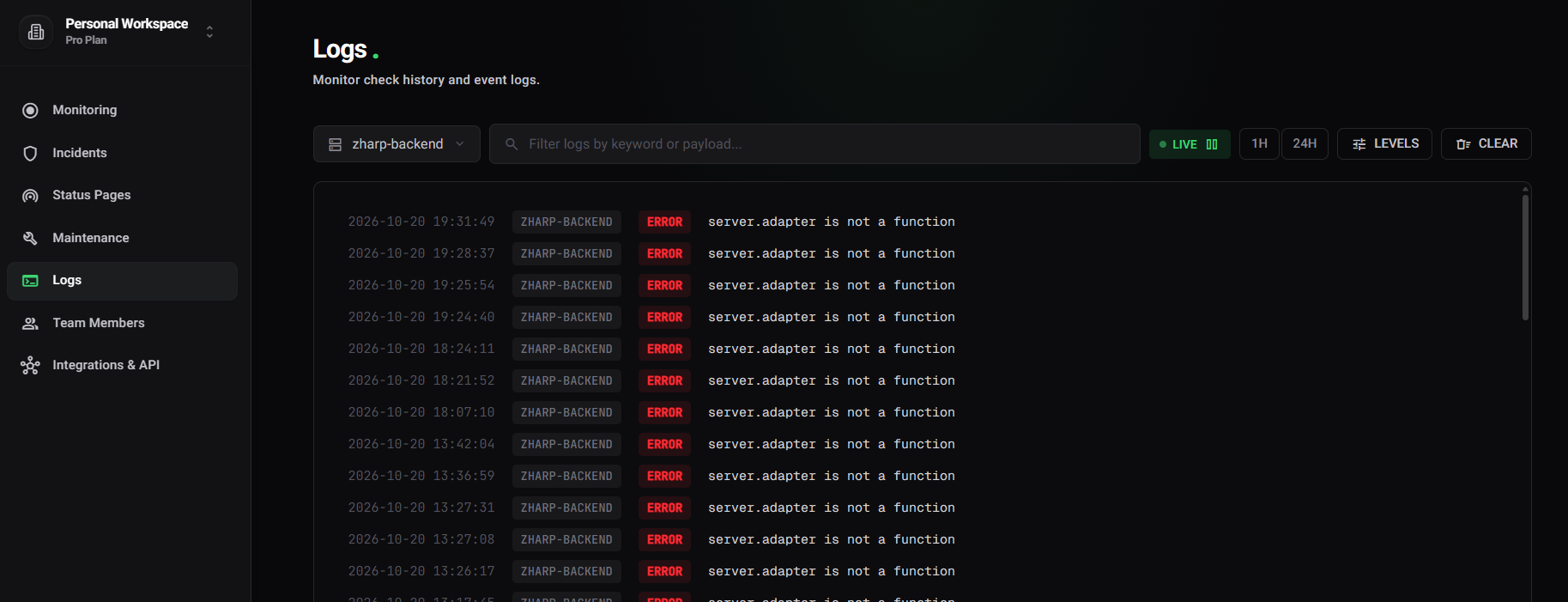
- New lines appear as they arrive while LIVE is on; click it to pause the stream.
- 1H and 24H show history; LEVELS filters by level.
- The search box finds words in the lines, and
@fieldconditions such as@http.status_code>=500filter on fields parsed from them. - Click a line to see everything it carried: its metadata, the error stack, the session id.
- To be told when something shows up, add a log monitor.
Logging
ZharpLogger.debug('Cache miss', { key: 'user:42' });
ZharpLogger.info('Request received', { path: '/checkout' });
ZharpLogger.warn('Rate limit approaching', { remaining: 5 });
ZharpLogger.error('Stripe webhook failed', { eventId: 'evt_123' });
ZharpLogger.fatal('Database connection lost');

// Any level, and optionally another service name for this one line:
ZharpLogger.log('error', 'Charge declined', { amount: 5000 });
ZharpLogger.log('payment-service', 'error', 'Charge declined', { amount: 5000 });
error and fatal are sent straight away; the other levels are queued and sent in batches, so logging never waits on the network. The message is always sent as text: an object as JSON, an Error as its message, anything else through String(), and an empty message as (empty message).
In a single-page app, call refreshContext() after each route change so the URL and route on later logs stay current:
// React Router
const location = useLocation();
useEffect(() => ZharpLogger.refreshContext(), [location.pathname]);

// Vue Router
router.afterEach(() => ZharpLogger.refreshContext());

// Next.js App Router, in a client component in the root layout
const pathname = usePathname();
useEffect(() => ZharpLogger.refreshContext(), [pathname]);
What a log carries
{
  "service": "checkout-web",
  "level": "error",
  "message": "Payment failed",
  "timestamp": "2026-10-20T09:14:32.041Z",
  "environment": "production",
  "version": "1.4.2",
  "source": "web",
  "metadata": {
    "orderId": 99,
    "sessionId": "a3f8c2d1-…",
    "environment": "production",
    "traceId": "4bf92f3577b34da6a3ce929d0e0e4736",   // only with @zharp/apm, inside a trace
    "spanId": "00f067aa0ba902b7",
    "context": {
      "url": "https://shop.example.com/checkout",
      "route": "/checkout",
      "userAgent": "Mozilla/5.0 …",
      "screen": "1920x1080",
      "appVersion": "1.4.2"
    }
  }
}environment,version(fromappVersion) andsourceare top-level tags, sent only when configured — or, in Node, found in the environment.environmentis repeated inmetadatafor older backends. These tags need 1.1.0.- Your own fields sit at the top of
metadata, next tosessionId— one per page load or process. The runtime details go undercontextso they never collide with yours: URL, route, user agent and screen size in a browser;hostname(the pod name in Kubernetes),pid,nodeVersionandplatformin Node. - With @zharp/apm running, a log written inside a trace also carries
traceIdandspanId.
How lines are tagged
servicebecomes the log's service,environmentits Environment,appVersionits Version andsourceits Source, so a log monitor scoped to an environment or source covers SDK logs too. See Unified service tagging.- An
infoline whose text starts with a level word —WARNING …,[ERROR] …— is stored at that level, the same as for lines from the agent. Lines sent at debug, warn, error or fatal keep the level you gave.
Delivery
How 1.1.0 sends:
- Logs wait in a queue of up to 500 entries; when it is full, the oldest is dropped. Every
flushInterval, up tomaxBatchSizeof them are sent, and no request is larger than about 1 MB — a larger batch is split. - Requests go to
/agent/logswith the key in anX-API-KEYheader, not in the address, andX-Zharp-SDK: js-logs/1.1.0. - A request that fails on the network or with a 5xx is tried three times in all: once, then after 2 seconds, then after 4. A 4xx is not retried.
- When a tab is hidden or closed, everything queued is sent with
navigator.sendBeacon, in pieces under 60 KB (browsers cap beacons at 64 KB). A beacon can't carry a header, so it is the one request with the key in its address (/agent/logs/<key>). A refused beacon falls back to akeepalivefetch, then an ordinary request. - In Node, the send timer doesn't keep the process alive, and what is still queued when the work runs out is sent on
beforeExit— a script doesn't need to calldestroy()to end.
await ZharpLogger.flush();     // send what is queued now
await ZharpLogger.destroy();   // send all of it, remove every handler and listener
ZharpLogger.isActive;          // whether init() succeeded and logs are being sent
destroy() is useful before a hot reload in development or at the end of a test; to change the configuration, call init() again instead.
With your existing logger
Each recipe forwards your logger's lines to Zharp and keeps your current output. Start the SDK first — with ZharpLogger.init() or --import @zharp/logs/init.
Winston
Install winston-transport as well — pnpm needs it declared even though Winston uses it.
import Transport from 'winston-transport';
import { ZharpLogger } from '@zharp/logs';

export class ZharpTransport extends Transport {
  log(info: any, callback: () => void) {
    const { level, message, ...meta } = info;
    ZharpLogger.log(level, String(message), Object.keys(meta).length ? meta : undefined);

    // Tells Winston this transport has finished with the line.
    setImmediate(() => this.emit('logged', info));
    callback();
  }
}

// const logger = winston.createLogger({
//   transports: [new winston.transports.Console(), new ZharpTransport()],
// });
Pino
import pino from 'pino';
import { Writable } from 'stream';
import { ZharpLogger } from '@zharp/logs';

// Pino levels are numbers — map them to Zharp's
const PINO_LEVELS: Record<number, string> = {
  10: 'debug', // trace → debug
  20: 'debug',
  30: 'info',
  40: 'warn',
  50: 'error',
  60: 'fatal',
};

const zharpStream = new Writable({
  write(chunk, _encoding, callback) {
    try {
      const { level, msg, ...meta } = JSON.parse(chunk.toString());
      // `logger.info({ orderId })` writes a line with no `msg` at all.
      const message = msg ?? (meta.err?.message || JSON.stringify(meta));
      ZharpLogger.log(PINO_LEVELS[level] ?? 'info', String(message), meta);
    } catch {}
    callback();
  },
});

const logger = pino(
  pino.multistream([
    { stream: process.stdout },   // keep your existing output
    { stream: zharpStream },      // and send to Zharp
  ]),
);
NestJS
// zharp-nest-logger.ts
import { LoggerService } from '@nestjs/common';
import { ZharpLogger } from '@zharp/logs';

// Named ZharpNestLogger so it doesn't shadow the ZharpLogger it forwards to.
export class ZharpNestLogger implements LoggerService {
  log(message: any, context?: string) { ZharpLogger.info(String(message), { context }); }
  error(message: any, trace?: string, context?: string) { ZharpLogger.error(String(message), { trace, context }); }
  warn(message: any, context?: string) { ZharpLogger.warn(String(message), { context }); }
  debug(message: any, context?: string) { ZharpLogger.debug(String(message), { context }); }
  verbose(message: any, context?: string) { ZharpLogger.debug(String(message), { context }); }
}

// main.ts
async function bootstrap() {
  // Key, service and environment from ZHARP_API_KEY / ZHARP_SERVICE / ZHARP_ENV,
  // or pass them: ZharpLogger.init({ apiKey, service: 'my-api', environment: process.env.NODE_ENV })
  ZharpLogger.init();

  const app = await NestFactory.create(AppModule, { logger: new ZharpNestLogger() });
  await app.listen(3000);
}
bootstrap();
With @zharp/apm
Start the logger first and ZharpAPM.init() needs no options — it reuses the logger's key, service, environment, version, source and endpoint:
import { ZharpLogger } from '@zharp/logs';
import { ZharpAPM } from '@zharp/apm';

ZharpLogger.init({ apiKey: 'YOUR_INGEST_ONLY_KEY', service: 'checkout-web', environment: 'production' });
ZharpAPM.init();   // no options: reuses the logger's key, service, environment, version, source and endpoint
In Node, preload both:
node --import @zharp/logs/init --import @zharp/apm/init app.js
- A log written inside a trace carries its
traceIdandspanId, so you can open the trace from the log and find a trace's logs. - Logs, spans and session recordings from the same page load or process share one
sessionId. warn,errorandfatallogs join the breadcrumb trail attached to the next exception, and anerrororfatallog flags the session recording when replay is on.
Neither package imports the other, so an app that uses only one never bundles the other. This needs @zharp/logs 1.1.0; 1.0.9 doesn't connect to @zharp/apm.