Android Logs
Zharp Logs for Android sends your app's logs and crashes to Zharp, from Kotlin and Java alike. It has no dependencies, works on Android 5.0 and up, and saves a crash to send on the next launch when it can't go out before the app closes.
One library covers both languages: it's written in Java 8, so it adds nothing to an older Java app, and Kotlin calls it like any Kotlin API. Every example below works in either — both are shown where they differ.
Install
In your app module's build.gradle.kts:
dependencies {
    implementation("io.zharp:zharp-logs-android:0.1.0")
}
or build.gradle:
dependencies {
    implementation 'io.zharp:zharp-logs-android:0.1.0'
}
It's on Maven Central, which new projects already list in settings.gradle. The library declares the INTERNET permission itself and adds about 30 KB to your app.
API key
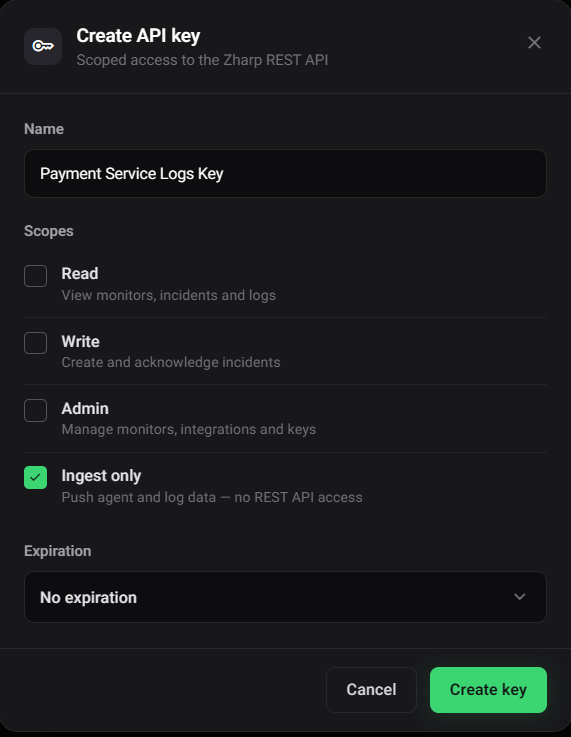
- In the dashboard, open Integrations & API and choose Main API keys.
- Click Create API key, give it a name, and tick Ingest only. That key can send data but has no access to the REST API, so it's safe inside an app someone can unpack — and it's available on every plan.
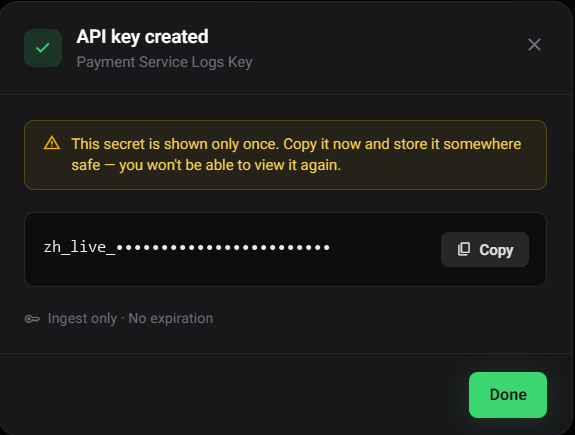
- Click Create key and copy the key. It's shown only once.
Start it
Call ZharpLogger.init() once, in your Application class's onCreate — before anything logs. Logs written before that are dropped.
class ShopApp : Application() {
    override fun onCreate() {
        super.onCreate()
        ZharpLogger.init(this, "YOUR_INGEST_ONLY_KEY", "shop-app")
    }
}public class ShopApp extends Application {
@Override
public void onCreate() {
super.onCreate();
ZharpLogger.init(this, "YOUR_INGEST_ONLY_KEY", "shop-app");
}
}If your app has no Application class yet, register the new one in AndroidManifest.xml:
<application
    android:name=".ShopApp"
    …>
More settings
Everything else goes through ZharpConfig:
ZharpLogger.init(this, new ZharpConfig.Builder()
        .apiKey("YOUR_INGEST_ONLY_KEY")
        .service("shop-app")
        .environment("production")
        .build());
From the manifest
Any setting can come from <meta-data> in the manifest instead of code — handy for a different key per build type through a Gradle placeholder:
<application …>
    <meta-data android:name="io.zharp.API_KEY" android:value="${zharpApiKey}" />
    <meta-data android:name="io.zharp.SERVICE" android:value="shop-app" />
    <meta-data android:name="io.zharp.ENVIRONMENT" android:value="production" />
</application>android {
defaultConfig {
manifestPlaceholders["zharpApiKey"] = "YOUR_INGEST_ONLY_KEY"
}
}ZharpLogger.init(this) // reads io.zharp.* from the manifest
A value set in code wins; anything it leaves out is read from the manifest, setting by setting.
Either way, one line goes to Logcat on startup:
I Zharp: [Zharp] Logging active — service "shop-app", environment "production"
| Situation | Written to Logcat |
|---|---|
| No key in the config or the manifest — nothing starts, every logging call does nothing | [Zharp] No API key found — pass one to ZharpLogger.init(), or set io.zharp.API_KEY in AndroidManifest.xml |
The manifest has io.zharp.DISABLED set to true — nothing starts, whatever the code asks for | [Zharp] Logging disabled by io.zharp.DISABLED — nothing will be sent |
A missing key never throws, so a build without one still runs. Calling init() again replaces the running setup; what the old one had queued is still sent.
Options
| ZharpConfig.Builder | Manifest <meta-data> | Default |
|---|---|---|
apiKey | io.zharp.API_KEY | — (nothing starts without one) |
service | io.zharp.SERVICE | The app's package name |
environment | io.zharp.ENVIRONMENT | None — unset means no tag |
appVersion | io.zharp.VERSION | The app's versionName |
source | io.zharp.SOURCE | None |
endpoint | io.zharp.ENDPOINT | https://api.zharp.io/api/v1 |
captureCrashes | — | On — see Crashes below |
flushOnBackground | — | On: everything queued is sent when the app leaves the foreground |
logcat | — | On in debuggable builds: each log is also written to Logcat under the tag Zharp |
flushIntervalMillis | — | 5000 |
maxBatchSize | — | 50 |
Logging
ZharpLogger.info("User signed in", mapOf("userId" to 42))
ZharpLogger.warn("Slow network detected", mapOf("latencyMs" to 3200))

try {
    charge(order)
} catch (e: Exception) {
    ZharpLogger.error("Payment failed", e, mapOf("orderId" to order.id))
}Map<String, Object> metadata = new HashMap<>();
metadata.put("userId", 42);
ZharpLogger.info("User signed in", metadata);
try {
charge(order);
} catch (Exception e) {
ZharpLogger.error("Payment failed", e);
}The map is optional and is kept with the log. A caught exception brings its type and full stack — causes included — by itself: you never pass a stack. The rest of the API:
ZharpLogger.debug("Cache miss")
ZharpLogger.fatal("Database corrupted")

ZharpLogger.error(e)                 // the exception alone: its type, message and stack
ZharpLogger.captureException(e)      // the same

// Any level, with an exception, and optionally another service name for this one log:
ZharpLogger.log(LogLevel.ERROR, "Charge declined", mapOf("amount" to 5000), e, "payments")
Logging only adds to a queue: requests are made on a background thread, never the one that logged, and a logging call never throws. error and fatal are sent straight away; the other levels go in batches. The message is always sent as text: an exception as IllegalStateException: Card declined, a map or list as JSON, and an empty message as (empty message).
ZharpLogger.setContext(mapOf("userId" to user.id))   // added to every log's context
ZharpLogger.resetSessionId()                          // e.g. when someone else signs in
Crashes
From the moment init() succeeds, an uncaught exception on any thread is sent as a fatal log with its stack, type: "uncaughtException" and the thread's name. The app still crashes as it would have, and any other crash reporter you use still gets it — Zharp passes the crash on to the handler that was there before.
A crashing app often ends before a request can finish, so the crash — and anything still queued — is saved to the app's storage first. If it can't be sent within 2 seconds (no network, say), it goes out the next time the app starts, with the time it actually happened. Turn crash capture off with .captureCrashes(false).
See your logs
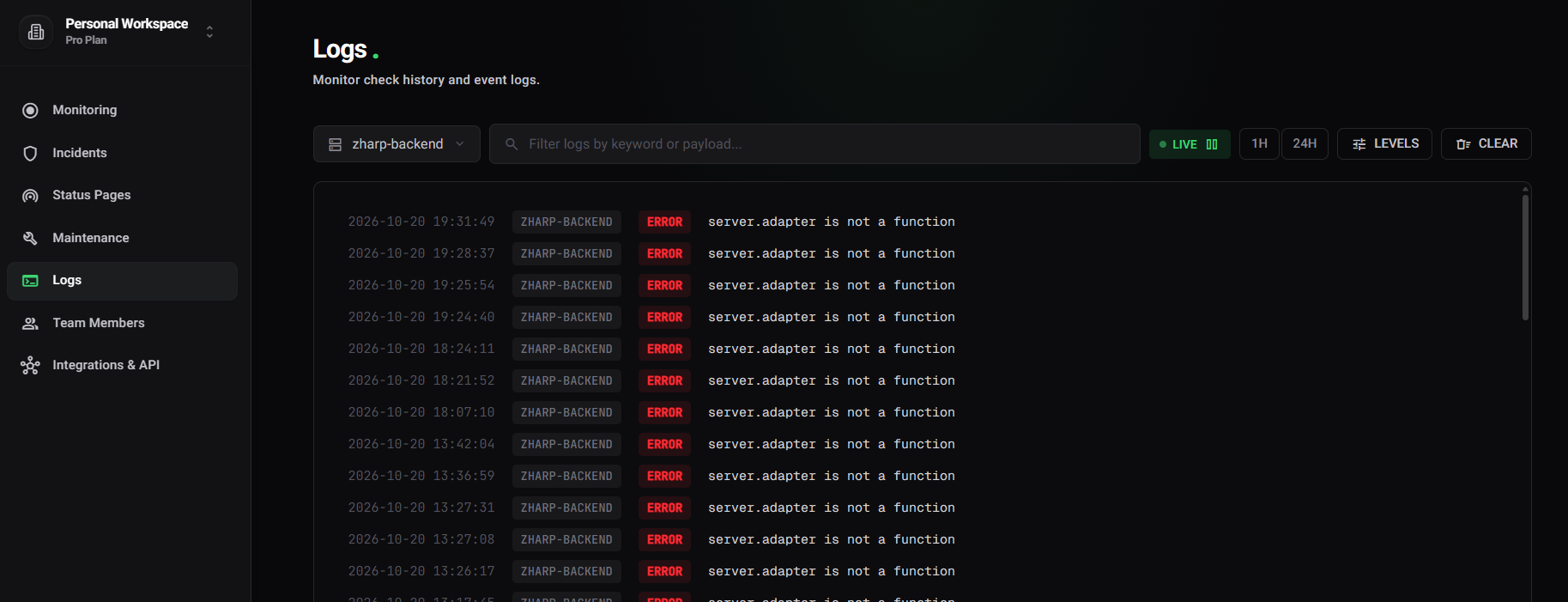
Open Logs in the dashboard sidebar and pick your service in the service dropdown — the service you gave init(), or your app's package name if you gave none. Click a line to see its metadata, the stack trace and the device it came from.
To be told when something shows up — a fatal from your app, say — add a log monitor.
What a log carries
{
  "service": "shop-app",
  "level": "error",
  "message": "Payment failed",
  "timestamp": "2026-10-26T06:29:56.170Z",
  "environment": "production",
  "version": "2.4.0",
  "metadata": {
    "orderId": 99,
    "name": "java.lang.IllegalStateException",
    "stack": "java.lang.IllegalStateException: Card declined\n\tat com.shop.CheckoutActivity.pay(CheckoutActivity.kt:28)\n…",
    "sessionId": "a3f8c2d1-…",
    "environment": "production",
    "context": {
      "platform": "android",
      "osVersion": "16",
      "sdkInt": 36,
      "manufacturer": "samsung",
      "model": "SM-S711B",
      "packageName": "com.shop.app",
      "versionCode": 240,
      "debuggable": false,
      "userId": 42,
      "appVersion": "2.4.0"
    }
  }
}environment,versionandsourceare top-level tags, sent when set;versiondefaults to your app'sversionName. See Unified service tagging.- Your own fields sit at the top of
metadata, next to an error'snameandstackand thesessionId— one per run of the app. - The device and app details go under
contextso they never collide with yours: Android version and API level, manufacturer and model, package name, version code, whether the build is debuggable, and whatever you set withsetContext.
Delivery
- Logs wait in a queue of up to 500 entries; when it is full, the oldest is dropped. Every
flushIntervalMillis, up tomaxBatchSizeof them are sent, and no request is larger than about 1 MB — a larger batch is split. - Everything queued is sent when the app's last activity stops — a backgrounded app can be killed without warning. Rotating the screen doesn't count as leaving.
- Requests go to
/agent/logswith the key in anX-API-KEYheader andX-Zharp-SDK: android-logs/0.1.0. - A request that fails on the network or with a 5xx is tried three times in all: once, then after 2 seconds, then after 4. A 4xx is not retried.
ZharpLogger.flush()      // send everything queued now, in the background
ZharpLogger.close()      // send it all and stop; logs after this are dropped until init() again
ZharpLogger.isActive()   // whether init() succeeded and logs are being sent
With Timber
Plant a tree that forwards to Zharp:
class ZharpTree : Timber.Tree() {
    override fun log(priority: Int, tag: String?, message: String, t: Throwable?) {
        val level = when (priority) {
            Log.VERBOSE, Log.DEBUG -> LogLevel.DEBUG
            Log.INFO -> LogLevel.INFO
            Log.WARN -> LogLevel.WARN
            Log.ERROR -> LogLevel.ERROR
            else -> LogLevel.FATAL
        }
        ZharpLogger.log(level, message, tag?.let { mapOf("tag" to it) }, t, null)
    }
}

// In Application.onCreate(), after ZharpLogger.init(…):
Timber.plant(ZharpTree())
If a DebugTree already writes to Logcat, set .logcat(false) in the config, or each line shows twice.
Release builds
Nothing to add for R8 or ProGuard: the library uses no reflection. Stacks from a minified build are obfuscated as usual — retrace them with the build's mapping.txt.
The source, and two small sample apps (Kotlin and Java) with a button for each kind of log, are at github.com/zharp-io/zharp-android-lib.